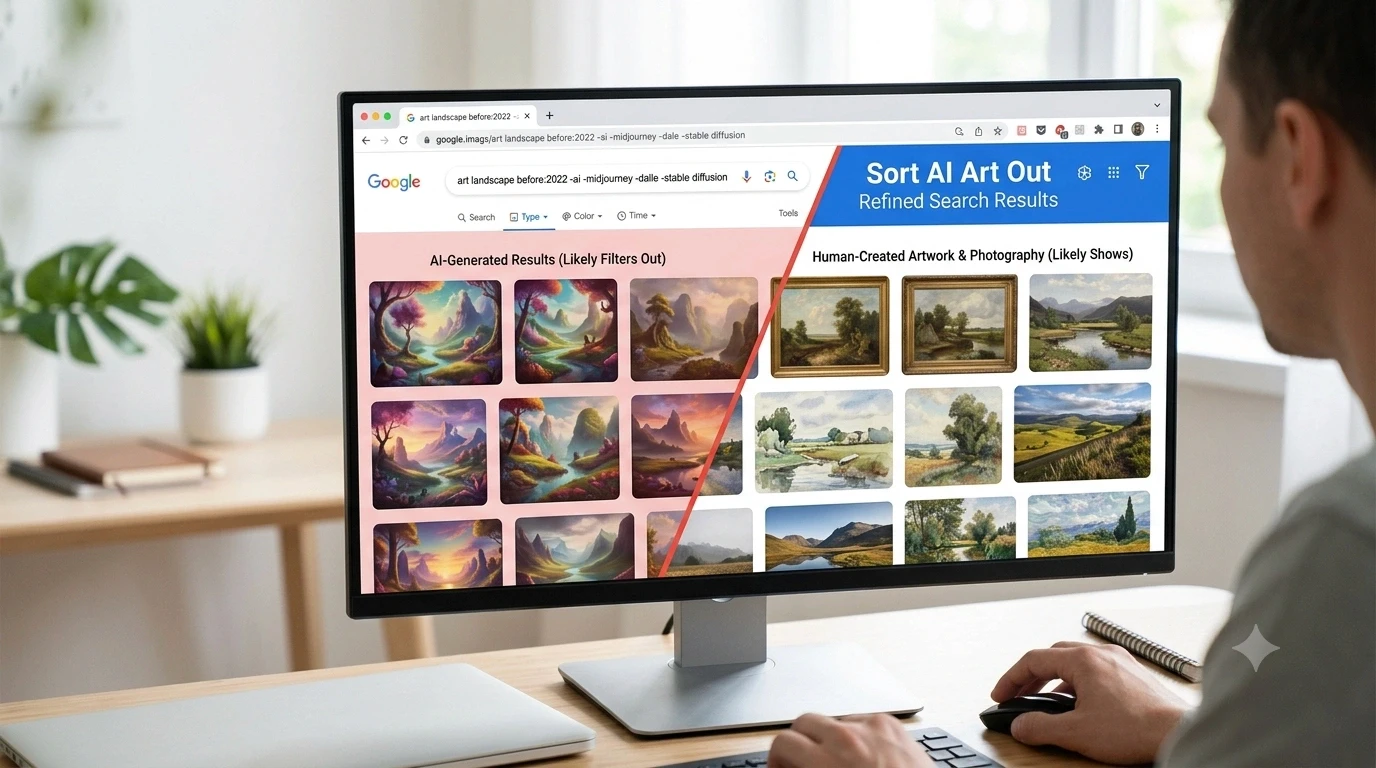
AI-generated images now appear in many Google Search and Google Images results. While they can be useful, many people want to see authentic images instead. This guide explains simple ways to reduce AI art in search results. You will learn how to use Google Search operators, browser extensions, AI blocklists, and date filters. You will also learn how to spot synthetic images that still appear in search. By the end, you will have a simple process for finding more original artwork and fewer machine-generated visuals.
Why AI-Generated Images Are Taking Over Search Results
Artificial intelligence has changed how images are created. Today, anyone can make AI-generated art in just a few seconds. Popular tools can create pictures from short text prompts. Because these images are easy to make, millions of them are uploaded every day.
Search engines want to show fresh content. As more creators publish AI-generated images, generative AI images, and machine-generated visuals, Google indexes them alongside traditional art. This means your search results often contain both real artwork and synthetic images.
Many people also call this trend AI imagery, genAI art, or even AI slop when low-quality images flood search results. These images may look attractive at first, but they do not always provide the originality or accuracy users expect.
This growing amount of content makes it harder to discover authentic artists, photographers, and designers. It also creates extra work for students, writers, researchers, and creative professionals who want reliable visual references.
Why Many People Want Human-Created Images Instead of AI Art in the USA
Many users prefer human-created art because it reflects real experience, creativity, and skill. An artist spends years learning techniques, while an AI model creates images by analyzing existing patterns.
Original artwork often tells a story. It carries emotion and personal style that many viewers appreciate. Researchers also trust authentic images because they are easier to verify.
Teachers may want students to study traditional paintings instead of synthetic images. Journalists often need original photographs instead of generated pictures. Designers may look for inspiration from real creators rather than algorithmic art.
Another reason is accuracy. AI tools sometimes create strange details. Hands may have extra fingers. Shadows may point in different directions. Objects may blend together in unusual ways. These small mistakes reduce trust in the image.
Because of these issues, many users actively search for non-AI images, pre-AI content, and authentic visual references.
How Google Search Displays AI Art and AI-Generated Images
Google Search does not always separate AI-generated content from human-created work. Instead, it ranks pages based on many signals, including relevance, quality, and popularity.
When you search in Google Images, you may see results from AI image platforms mixed with traditional artwork. Some websites specialize in algorithmic art, while others publish both real and AI-created content.
Google also introduced AI Overviews, which summarize information for many searches. These summaries save time, but they can push regular web pages farther down the results. Some users prefer opening the Web filter because it focuses more on standard web pages.
Google Images offers useful filters like image size, color, and usage rights. However, there is still no perfect built-in filter that removes every AI-generated image. That is why many users combine search operators with browser tools.
Understanding how search results work helps you choose better filtering methods instead of relying on one solution.
How to Sort AI Art Out of Google Search Using Google Search Operators
Search operators are one of the easiest ways to improve your results. They help Google understand exactly what you want to include or exclude.
One helpful option is the before:2022 operator. Most AI image generators became widely available after 2022. Searching for older content often increases your chances of finding traditional artwork.
You can also remove common AI terms by adding the minus operator. For example:
-ai
-midjourney
-"stable diffusion"
-prompt
-seed
-checkpoint
-lora
These exclusions tell Google not to prioritize pages containing those words.
Another useful trick is excluding websites that mainly publish AI-generated content. You can use the -site: operator to remove domains that focus on synthetic images.
You can also combine several operators into one search. This creates a cleaner search experience without making your query too complex.
Keep in mind that no search operator is perfect. Some AI images may still appear, while some useful pages may disappear. Testing different combinations usually gives the best results.
Use Google Images Filters to Find More Authentic Images
Google Images includes several tools that help narrow your search.
Start by opening the Tools menu after searching. You can sort results by image size, color, usage rights, and time. These filters cannot completely block AI-generated art, but they can improve the quality of your results.
If you want older content, combine these filters with before:2022. Older pages often contain original artwork instead of recent AI imagery.
Many experienced search users also prefer the Web filter instead of the default search results. Another popular option is using udm=14, which shows a cleaner version of Google Search with fewer extra features. Some users save it as a custom search shortcut for faster access.
You can also try verbatim search when you need Google to follow your exact query more closely. This reduces unnecessary keyword expansion and sometimes improves search accuracy.
Although these methods cannot remove every AI-generated image, they make finding authentic images much easier.
Browser Extensions and AI Blocklists That Hide AI Art
Browser tools provide another strong layer of filtering.
Many users install uBlock Origin together with the HUGE-AI Blocklist. This popular blocklist hides many websites that mainly publish AI-generated content. Some versions also support Google Images, Bing, and DuckDuckGo.
Another useful option is uBlacklist. It lets you hide specific websites from search results. If you notice the same AI image sites appearing repeatedly, you can block them with just a few clicks.
Extensions such as Pre-AI Search and AI Image Filter also help reduce AI-generated results. Some hide images, while others blur or mark them before you open the page.
These tools work best when combined with Google Search operators instead of replacing them. A layered approach gives cleaner results and saves time during research.
Many blocklists receive regular updates because new AI websites appear every month. Keeping your extension updated improves its performance and reduces unwanted results.
Using several simple methods together creates a much better search experience than relying on only one filter.
How to Spot AI-Generated Images That Slip Through Filters
Even the best filters cannot remove every AI-generated image. Learning to recognize common signs helps you avoid mistakes.
Start by looking at small details. AI images often have AI artifacts that are easy to miss at first. Hands may have extra fingers or fingers that blend together. Eyes may not match. Teeth can look uneven. Hair may flow in strange directions without a clear pattern.
Next, check the lighting. Human photographers usually create natural shadows. AI systems sometimes place shadows in different directions or make them too soft. Reflections in mirrors and water can also look incorrect.
Textures are another clue. Clothes, leaves, bricks, and animal fur may appear smooth in one area and blurry in another. Fine details often repeat in unusual ways because the model creates patterns instead of real objects.
Some AI images include hidden information called metadata. Newer systems may use SynthID or IPTC labels such as algorithmicMedia to identify generated content. Not every image contains this information, but when it does, it can help you understand how the image was created.
You may also notice words connected to image generation. Pages that mention prompts, sampling methods, CFG values, seeds, checkpoints, or other generation parameters often contain AI-created visuals. These terms do not always mean the image is artificial, but they provide useful clues.
When you combine careful observation with search filters, you can identify many AI-generated images before using them in your work.
Build a Human-Only Search Workflow for Better Results
Instead of depending on one trick, create a simple routine that you can use every time you search.
Begin with a clear search phrase. If you need historical artwork or reference photos, add before:2022 to reduce newer AI content. Then remove common AI terms with the minus operator, such as -ai, -midjourney, or -"stable diffusion."
After that, use the Web filter or open Google with udm=14 if you prefer a cleaner results page. Many people save this as a browser shortcut so they can use it every day.
Next, install trusted browser tools. A combination of uBlock Origin and the HUGE-AI Blocklist can hide many dedicated AI websites. If a mixed website still appears too often, add it to uBlacklist.
Review the images before downloading them. Check for visual mistakes, repeated textures, or unusual shadows. If something looks odd, compare it with another source.
This step-by-step process does not promise perfect results, but it greatly improves your chances of finding human-created art, original artwork, and authentic images without spending extra time.
Common Mistakes That Make AI Art Harder to Filter Out
Many users become frustrated because they expect one solution to remove every AI image. Unfortunately, search does not work that way.
One common mistake is using only one search operator. A single keyword exclusion rarely removes every AI-generated result because websites describe content in different ways.
Another mistake is forgetting date filters. Older pages often contain traditional artwork, while newer pages may include more synthetic images. Ignoring time settings means you may see more AI content than necessary.
Some users also forget to update their browser extensions. AI websites appear regularly, and blocklists need updates to stay effective.
Another problem comes from blocking too many websites. Very aggressive lists can create false positives by hiding useful pages that contain both human-created and AI-generated content. It is better to review your blocklist from time to time and adjust it if needed.
Finally, do not ignore AI Overviews if they distract you. Switching to the Web view or using cleaner search methods often creates a better research experience.
Small improvements can make a big difference over time.
Frequently Asked Questions About Filtering AI Art From Google Search
Can Google completely remove AI-generated images?
No. Google does not currently offer a single button that removes all AI-generated images. Using search operators, browser extensions, and blocklists together gives better results.
Does udm=14 still help?
Many users still find udm=14 useful because it opens a simpler search experience with fewer extra features. Results may change as Google updates Search, but many people continue using it.
Which browser extension works best?
There is no perfect choice for everyone. Many users combine uBlock Origin with the HUGE-AI Blocklist, while others prefer Pre-AI Search or AI Image Filter depending on their browsing habits.
Can metadata always identify AI images?
No. Some AI images include SynthID or IPTC metadata, but many do not. That is why checking visual details remains important.
Are there alternatives to Google for AI-free image searches?
Some search engines and browser tools offer stronger AI filtering options. Even then, no system can guarantee completely AI-free results, so reviewing images carefully is still the best approach.
Find More Authentic Images With Smarter Search Techniques
Finding original artwork has become more difficult as AI-generated content grows across the internet. Still, you can improve your results with a few practical habits.
Use search operators to remove common AI keywords. Try date filters like before:2022 when you need older content. Open cleaner search views with the Web filter or udm=14. Install trusted browser extensions and updated AI blocklists. Finally, examine images for visual clues and metadata before using them.
These methods work best together. They reduce unwanted results while helping you discover more authentic images, traditional art, and reliable visual references. As search technology continues to change, staying informed will help you build a smarter and more effective search routine.
At RRDPress LLC, we believe good search habits save time and improve the quality of your research. We focus on practical guides that solve real problems with clear, easy-to-follow advice.
If you want more simple guides, search tips, and practical digital resources, visit RRDPress LLC and explore our latest articles. Our goal is to help you make better decisions online with trusted, easy-to-understand content.